

Longbridge's take-profit and stop-loss feature has been fully upgraded.

In stock market investing, we all hope that every trade can protect profits and control risks. In the face of market volatility, robust risk management can help you avoid losses and maximize returns. By setting reasonable targets and timely taking profits or cutting losses, you can more confidently navigate market changes and achieve more stable investment returns.
What Are Take-Profit and Stop-Loss Orders?
Take-profit and stop-loss are two commonly used risk management strategies in stock trading, designed to control investment risks and maximize returns. Here’s a simple explanation of "take-profit and stop-loss":
Take-Profit: Refers to selling a stock when it reaches a preset target price to lock in profits. This helps avoid the risk of losing gains due to a market downturn. The take-profit price can be set based on technical analysis, fundamental analysis, or other factors.
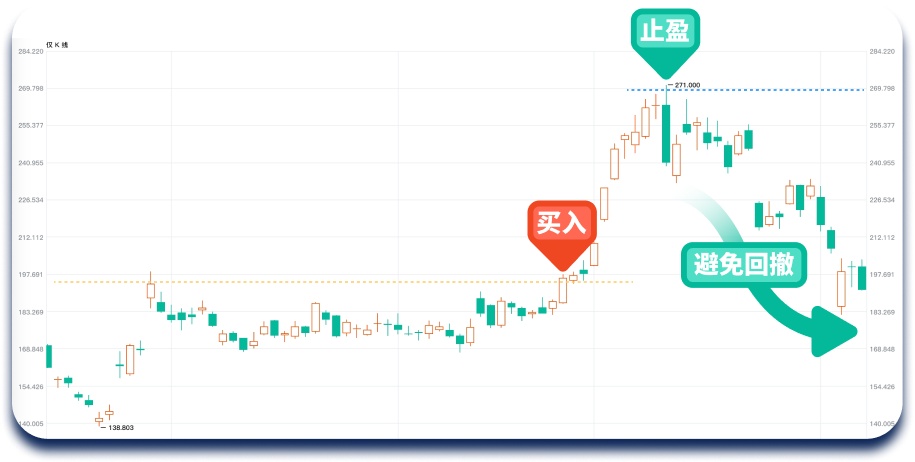
- For example, if you believe a stock will perform well and buy it at $197 when it breaks through a previous trading range, while also placing a take-profit order at $270; when the stock price rises to $270, the system automatically sells your position at $270 as instructed. In subsequent trading days, you find that you successfully avoided a price pullback and locked in profits:
Stop-Loss: Refers to selling a stock when it falls to a certain level to limit losses. This helps investors protect their principal during market volatility or unfavorable conditions, avoiding further losses.
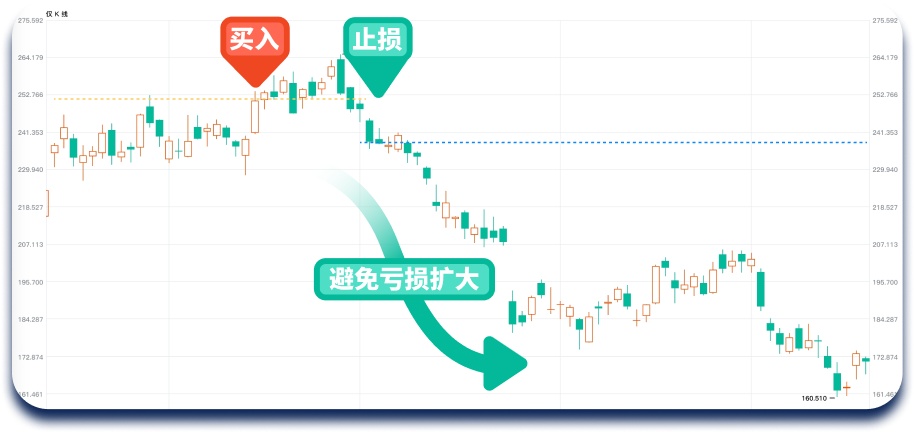
- For example, if you buy a stock when it breaks through a previous high of $252 and set a stop-loss order at a 7% decline; when the stock price drops by 7%, the system automatically sells your position at the preset stop-loss price. Later, you realize this operation successfully controlled risks and prevented further losses:
To summarize the importance of take-profit and stop-loss functions:
- Take-Profit Order: Triggers a closing position when the stock price reaches the preset profit target, locking in profits.
- Stop-Loss Order: Triggers a closing position when the stock price falls below the preset loss target, limiting losses.
The Rose of Time: The Long-Term Effects of Disciplined Investing
If we adhere to the discipline of take-profit and stop-loss, what would be the ideal outcome after 100 trades? Key assumptions:
- Win rates for each trade are 30%, 40%, and 50% (i.e., the probability of profit per trade);
- Each trade sets a 20% take-profit and 10% stop-loss;
- Initial capital: $1,000 USD;
- After each trade completes take-profit or stop-loss, proceed to the next trade, accumulating 100 trades;
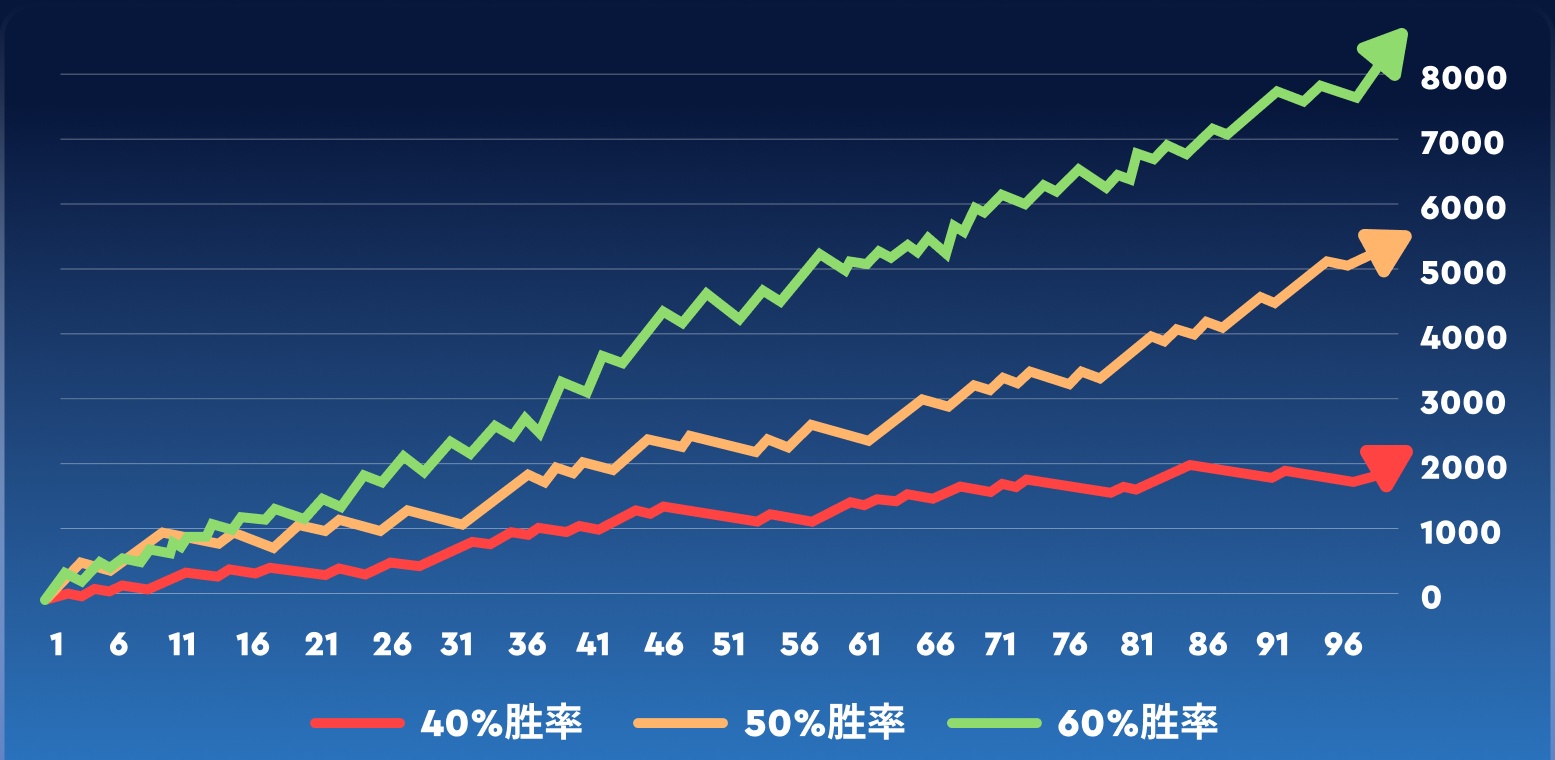
As the number of trades increases, regardless of the win rate, consistently applying take-profit and stop-loss strategies can help gradually accumulate profits. In the process of executing this disciplined approach, we can better control risks, maintain a steady mindset, maximize profits, and gradually improve our investment skills.
Longbridge’s Upgraded Take-Profit and Stop-Loss Features
We are committed to providing users with a more professional trading system. By upgrading take-profit and stop-loss functionalities, we aim to help users easily implement systematic trading strategies with one-click configurations, protecting profits and limiting losses.
More Convenient Order Placement
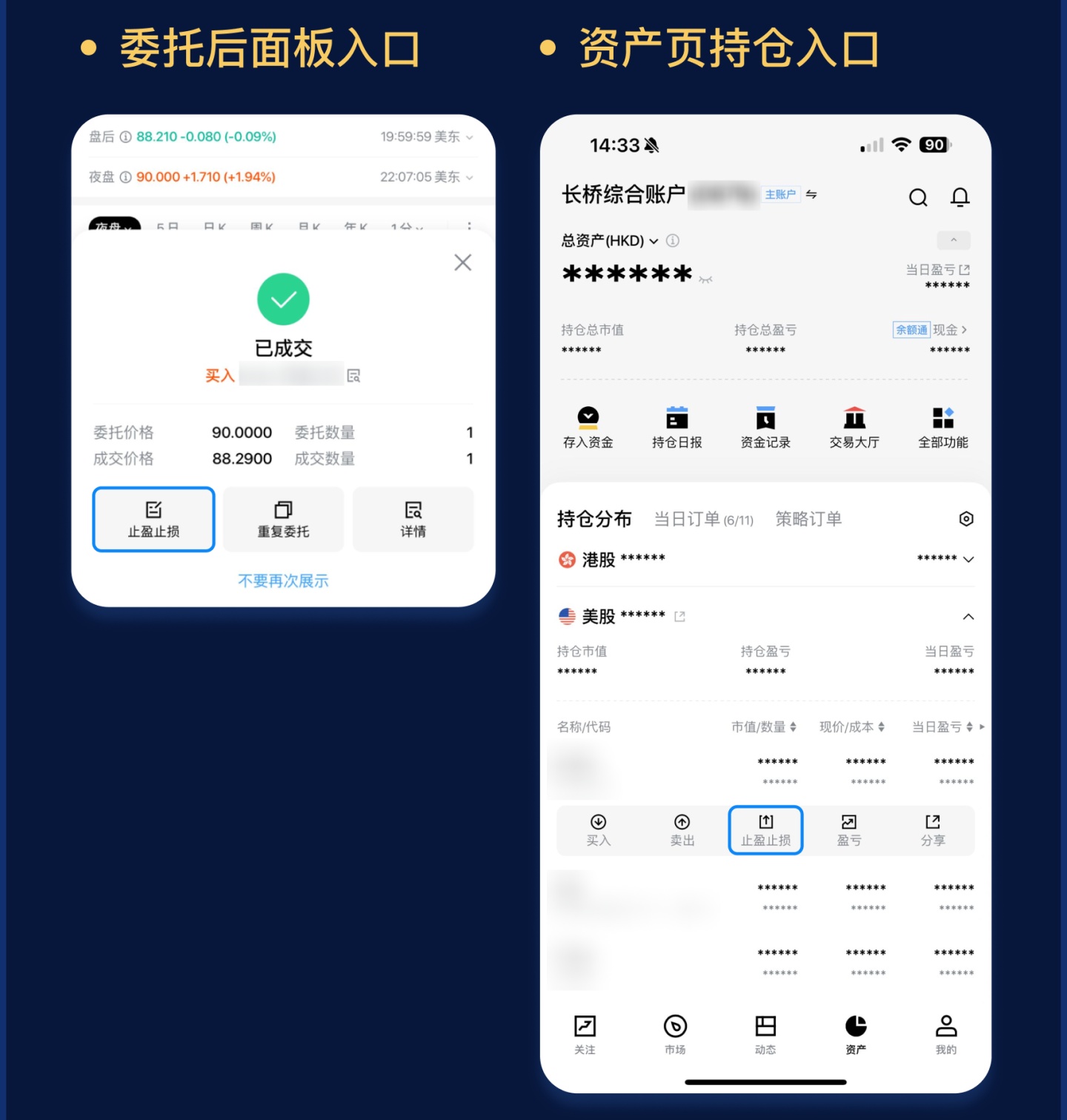
In addition to setting take-profit and stop-loss orders via "attached orders" during order placement, Longbridge now supports setting these orders in the order delegation panel and position interface for existing holdings. This makes it more convenient to apply take-profit and stop-loss based on your investment discipline and technical analysis.
Simpler Order Interface
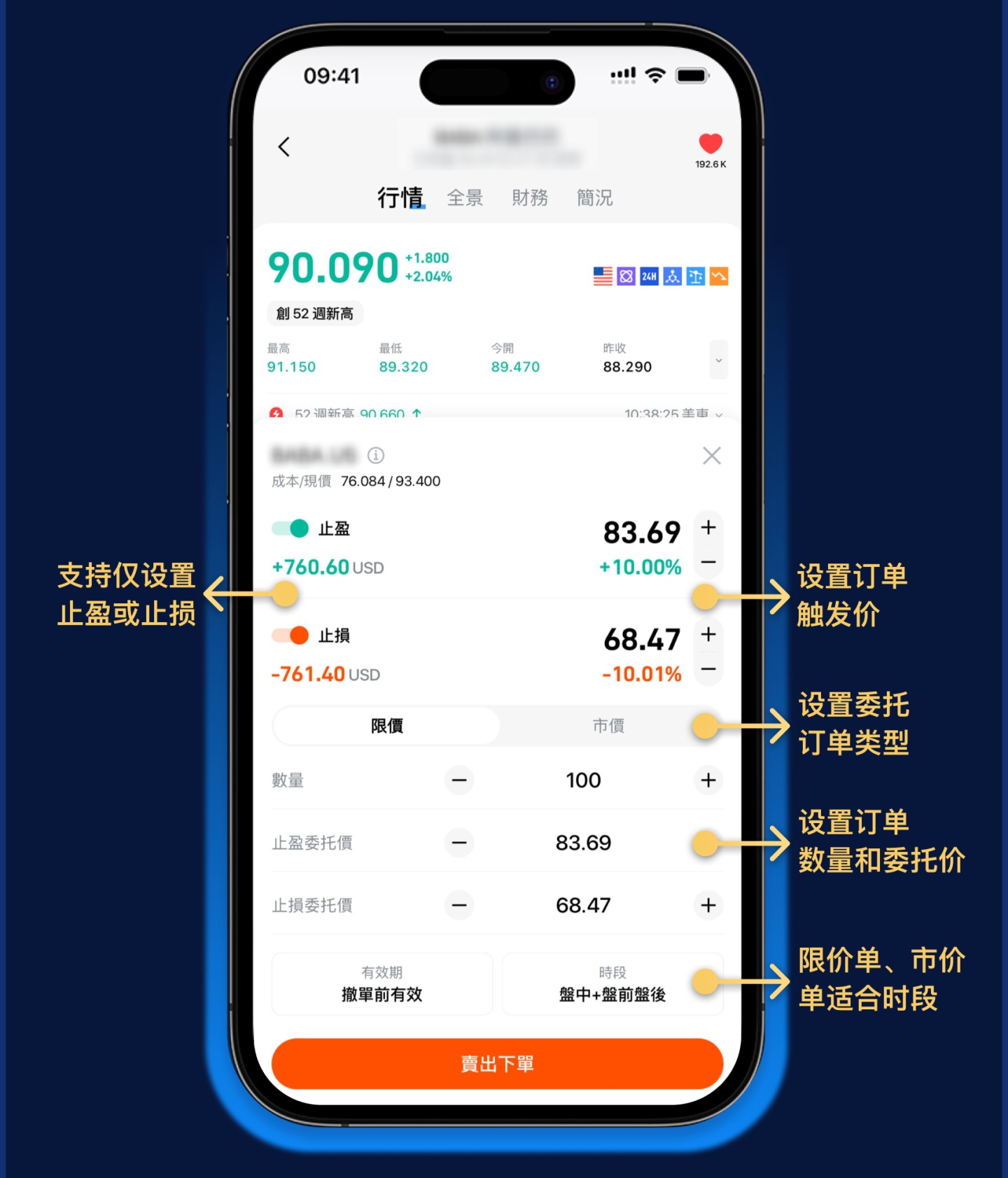
You can now set take-profit and stop-loss parameters through a streamlined interface, with the option to set only take-profit or only stop-loss. Once configured, you don’t need to monitor the market in real time—let the system execute orders according to your investment discipline, scientifically freeing profits!
How to Easily Set Take-Profit and Stop-Loss on Desktop
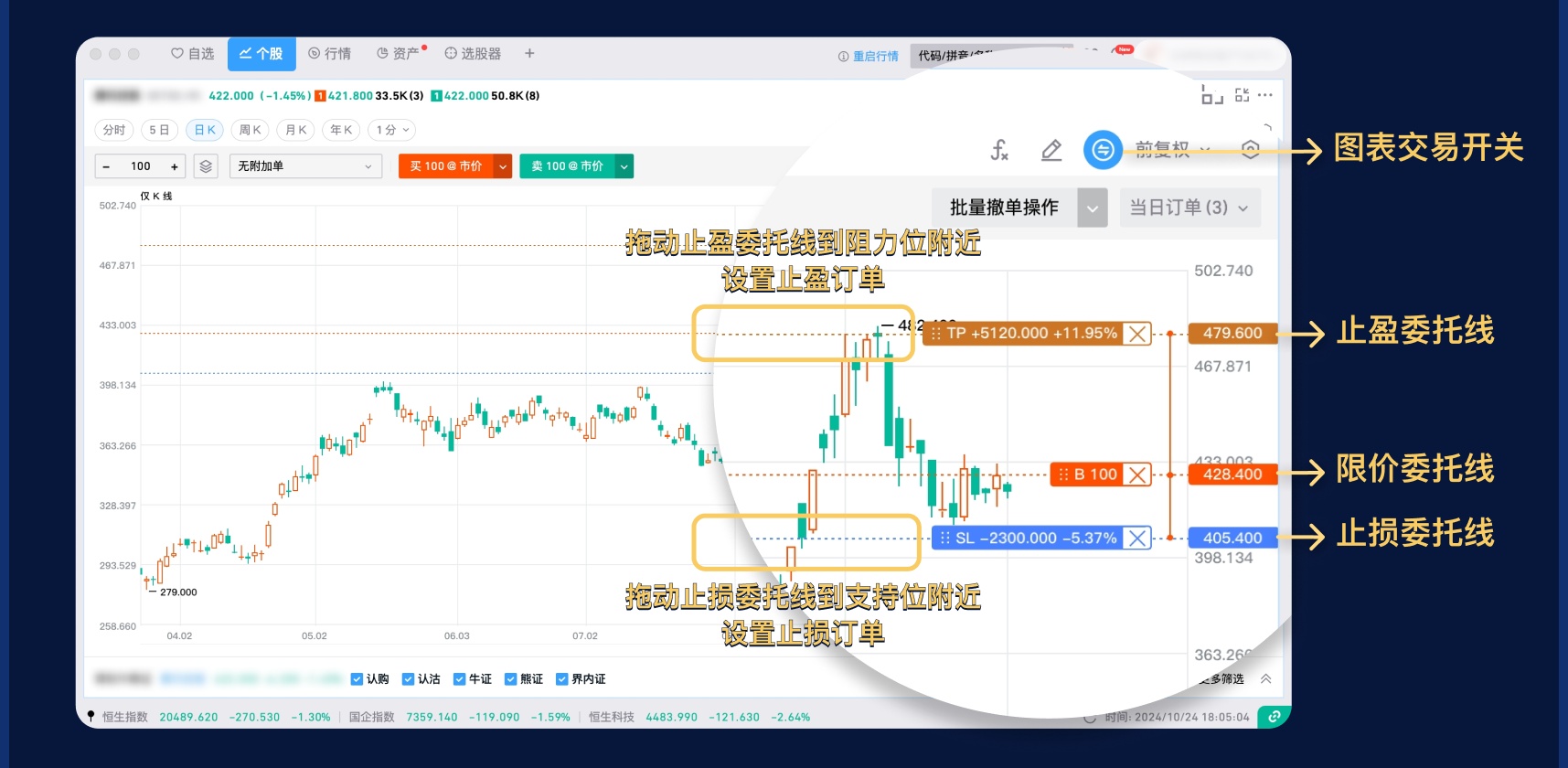
The desktop version also supports convenient take-profit and stop-loss attached orders: When using chart trading or market depth tools, you can drag the take-profit or stop-loss delegation lines on the chart to your desired price to complete the order delegation.
Detailed Instructions for Take-Profit and Stop-Loss Features
To learn more about take-profit and stop-loss functions, settings, and order placement considerations, please visit: Take-Profit and Stop-Loss - Help Center
The copyright of this article belongs to the original author/organization.
The views expressed herein are solely those of the author and do not reflect the stance of the platform. The content is intended for investment reference purposes only and shall not be considered as investment advice. Please contact us if you have any questions or suggestions regarding the content services provided by the platform.
